Command Palette
Search for a command to run...
オブジェクト検出APIのためのユーザーフレンドリーなグラフフレームワークを用いたTensorFlow
オブジェクト検出APIのためのユーザーフレンドリーなグラフフレームワークを用いたTensorFlow
Heemoon Yoon Sang-Hee Lee Mira Park
TensorFlow による RoBERTa の始め方
概要
TensorFlowは、ディープラーニングのデータフローのためのオープンソースフレームワークであり、音声解析、自然言語処理、コンピュータビジョンのアプリケーションプログラミングインタフェース(API)を含んでいる。特に、コンピュータビジョン分野におけるTensorFlow物体検出APIは、農業、工学、医学の技術に広く適用されているが、コマンドラインインタフェース(CLI)およびコードの使用により、情報技術(IT)分野の一般ユーザーや初心者の参入障壁は依然として高い。したがって、本稿の目的は、TensorFlow Graphical Framework(TF-GraF)と呼ばれる、TensorFlow上の物体検出APIのためのユーザーフレンドリーなグラフィカルフレームワークを開発することである。TF-GraFは、サーバー側でユーザーアカウントに応じて独立した仮想環境を提供し、さらにクライアント側でCLIなしにデータ前処理、学習、評価を実行可能とする。さらに、TF-GraFを通じて、ハイパーパラメータの設定、学習プロセスのリアルタイム観察、テスト画像の物体可視化、およびテストデータのメトリクス評価も操作可能である。特に、TF-GraFは、GUI環境を通じて、畳み込みニューラルネットワーク(InceptionsおよびResNetsを含む)であるSSD、Faster-RCNN、RFCN、Mask-RCNNの柔軟なモデル選択をサポートする。
One-sentence Summary
The authors introduce the TensorFlow Graphical Framework (TF-GraF), a graphical interface that replaces the command-line object detection API with an intuitive GUI enabling non-experts to configure models including SSD, Faster-RCNN, RFCN, Mask-RCNN, Inception, and ResNet architectures, manage server-side virtual environments, and execute data preprocessing, training, and metric evaluation without coding.
Key Contributions
- The paper introduces TF-GraF, a graphical framework that exposes the TensorFlow object detection API through an intuitive interface, eliminating the command-line dependencies and high technical barriers that hinder non-IT users.
- The system employs a server-client architecture to provision isolated virtual environments per user account and automates data preprocessing, hyperparameter configuration, real-time training monitoring, and metric evaluation without requiring programming expertise.
- The framework supports flexible selection of SSD, Faster-RCNN, RFCN, Mask-RCNN, Inceptions, and ResNets, enabling direct model training, testing, and visualization through a graphical interface.
Introduction
Deep learning has rapidly advanced computer vision, positioning object detection as a vital capability for applications spanning healthcare, agriculture, and engineering. Despite the power of mainstream frameworks like TensorFlow, their practical deployment remains hindered by complex installation procedures, dependency management, and heavy reliance on command-line interfaces that demand specialized programming expertise. Existing visual programming tools also fall short due to unintuitive designs and steep learning curves. To bridge this gap, the authors leverage the TensorFlow object detection API to develop TF-GraF, a graphical framework that translates model configuration, training, and evaluation into an accessible interface. This approach enables researchers to build and analyze object detection models without writing code, significantly lowering the technical barrier to entry for deep learning workflows.
Dataset
- Dataset Composition and Sources: The authors source their images and annotations from the Common Objects in Context (COCO) dataset, retrieved directly from the official COCO repository.
- Subset Details: The complete dataset is partitioned into an 80 percent training subset and a 20 percent testing subset. The provided text does not specify additional filtering rules, class distributions, or exact image counts for either subset.
- Data Usage and Processing: The authors convert the raw COCO data into TFRecord format and generate labelmap files to prepare the data for the TensorFlow Object Detection API. Fifty percent of the training subset undergoes data augmentation, which includes random horizontal flips, brightness, contrast, and saturation adjustments, and 90 degree rotations. The processed training data is used to train object detection models, with performance evaluated using Pascal VOC metrics and mean average precision (mAP). Final model checkpoints are converted into inference graph files to enable real time detection.
- Additional Processing Workflow: All preprocessing, augmentation, and model configuration steps are managed through the TF GraF graphical framework. The pipeline supports architecture selection, hyperparameter tuning, and automated checkpoint management to streamline the transition from training to deployment.
Method
The TF-GraF framework is structured as a client-server architecture designed to abstract the complexities of TensorFlow's command-line interface into a user-friendly graphical environment. The system enables users to perform object detection tasks without writing code by replacing command-line interactions with intuitive GUI operations. The overall workflow begins with user access to the client-side interface, which communicates with the server-side to execute deep learning tasks. The client-side, implemented using Java Swing, provides a visual interface that guides users through a step-by-step process, allowing them to control operations via button clicks instead of direct command-line input.
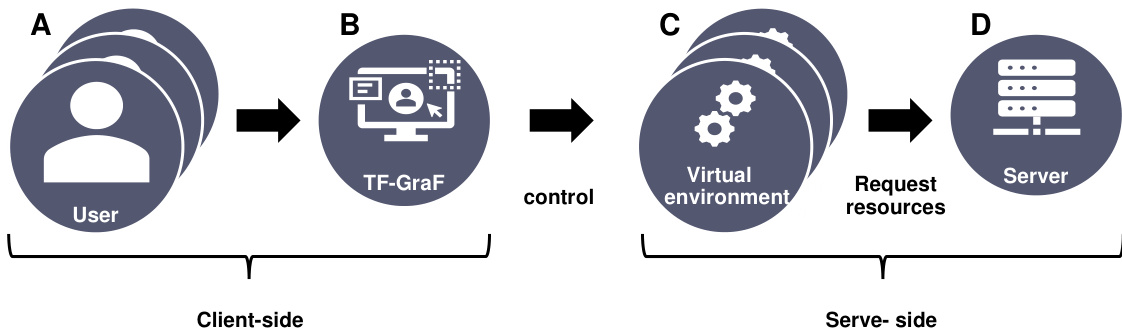
As shown in the figure below, the framework consists of two primary components: the client-side and the server-side. The client-side serves as the user interface where users interact with the system through a graphical environment. It includes six distinct modules: a toolbar for file management, a directory and file display view, a training control panel, a command-line interface for advanced operations, an image preview window, and a view displaying the current directory path and active environment. These components allow users to upload and manage datasets, configure training parameters, and monitor results without engaging with raw code. The client-side's main function is to translate user actions into commands that are sent to the server-side for execution.
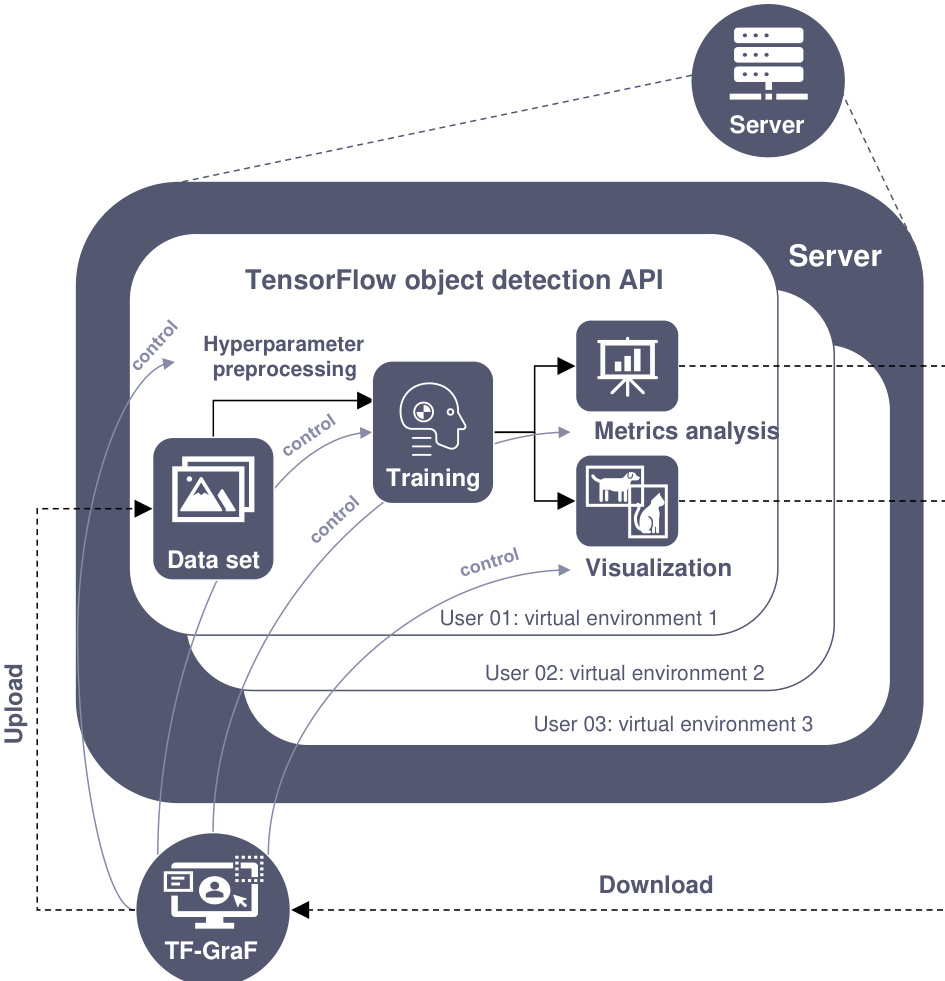
The server-side hosts the TensorFlow object detection API environment and manages all computational tasks. Each user is assigned an independent virtual environment, ensuring isolation and security of data and configurations. These virtual environments are preconfigured with the necessary dependencies and TensorFlow APIs, allowing users to avoid the complexities of software installation and environment setup. Within each virtual environment, the framework supports a variety of object detection architectures—such as SSD, Faster-RCNN, RFCN, and Mask-RCNN—and backbones including MobileNets, Inceptions, and ResNets. The server-side also handles data preprocessing, model training, evaluation, and visualization, with results being returned to the client-side for display. The separation of user environments enhances maintainability, as administrators can manage individual configurations without affecting other users.
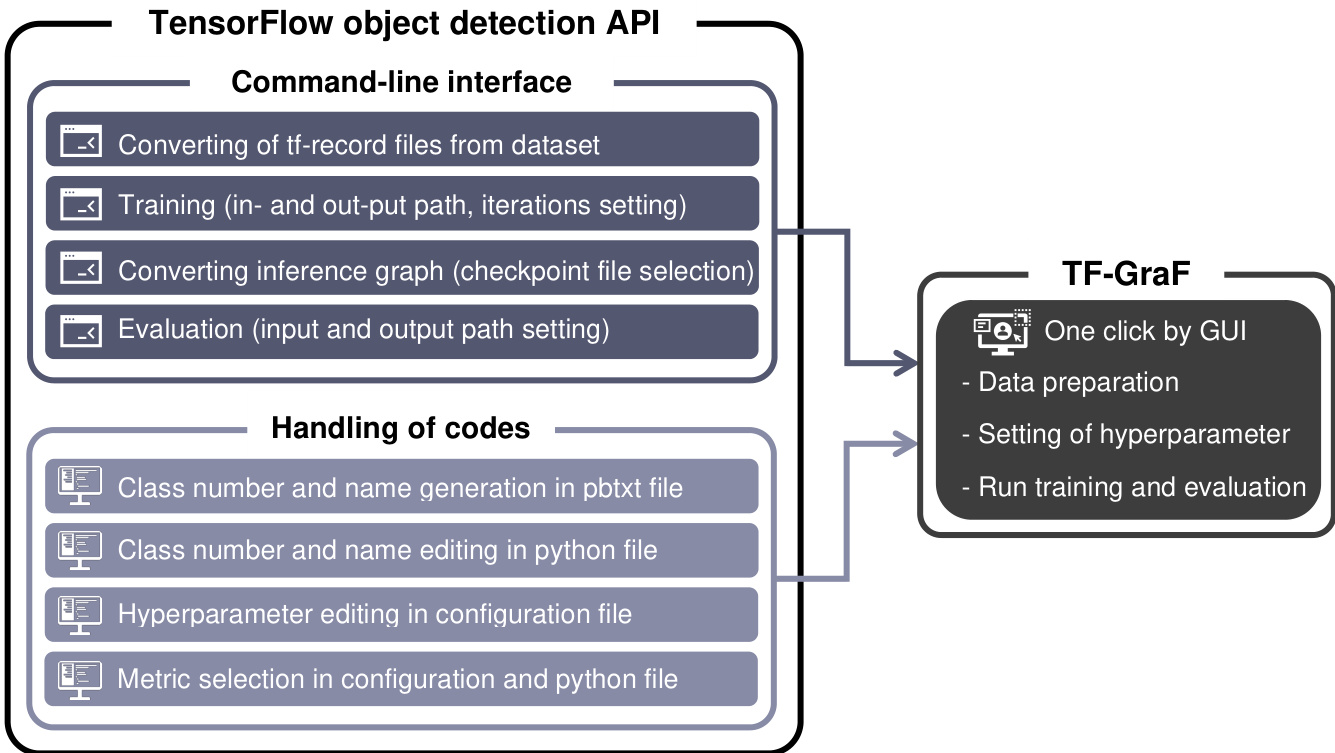
The framework's architecture allows for seamless integration of high-level functionalities such as data preprocessing, hyperparameter tuning, and model evaluation. Data preparation involves converting annotation files (in XML or CSV format) into tfrecord files and generating labelmap files, which are essential for training. Users can select model architectures and backbones through the GUI, set the number of training steps, and configure hyperparameters. Once the training process is initiated, the server-side executes the training, computes metrics, and generates visualizations of detected objects in test images. The results, including trained models, evaluation metrics, and visual outputs, are then downloaded to the client-side for review. This end-to-end process enables users to design, train, and deploy object detection models efficiently, without requiring prior knowledge of deep learning frameworks or programming.
Experiment
The experiments utilized the TF-GraF platform to train and evaluate four object detection architectures, validating its capacity to manage the complete deep learning workflow from model training and real-time monitoring to performance assessment and visual inference. By successfully processing checkpoints, calculating evaluation metrics, and generating segmentation outputs, the framework demonstrates robust integration capabilities for standard detection models. However, the requirement for externally generated annotated datasets introduces additional dependencies that may complicate the user experience and reduce accessibility for non-technical researchers.